With reports on the news that cell phones still do not work in Port Au Prince, Hati and there is no power, I was curious how some users were able to access the Internet to send email or Twitter from Hati. I came across this Twitter list of individuals that are tweeting live from Hati. It includes the Twitter user and blogger Troy Livesay that has power and Internet usage from a generator. The Twitter list was complied by Georgia Popplewell of Global Voices Online.
Hati Twitter Users List - tweeting live from Hati
http://twitter.com/georgiap/live-from-haiti
Troy Livesay
http://www.livesayhaiti.blogspot.com/
Georgia Popplewellhttp://twitter.com/georgiap
Reference
http://ghostsofhoratioalger.com/2010/01/haiti-and-communications/
Thursday, January 14, 2010


Wednesday, January 13, 2010
Netflix Roku Box - 2010 Review
Roku HD Digital Video Player - 2010 Review
For the holidays, I bought a Netflix Roku box for a a family member and me. I subscribed to Netflix for the $8.99 minimum (1 DVD by mail) and now I can watch any of the 17,000 Watch Instantly titles on my Samsung Flat Screen TV with the Roku box plugged into the free HDMI port on my TV using my wi-fi network. It's only a portion of their 100K DVDs but there are plenty of videos in their library that I haven't seen and if I don't like the video, I can move to the next one.
Here are some general notes on my experience:

For the holidays, I bought a Netflix Roku box for a a family member and me. I subscribed to Netflix for the $8.99 minimum (1 DVD by mail) and now I can watch any of the 17,000 Watch Instantly titles on my Samsung Flat Screen TV with the Roku box plugged into the free HDMI port on my TV using my wi-fi network. It's only a portion of their 100K DVDs but there are plenty of videos in their library that I haven't seen and if I don't like the video, I can move to the next one.
Here are some general notes on my experience:
- Roku Box - I ordered the $99 Roku HD box with free shipping. Even if you don't have a HD TV, I would order the HD box since you will probably end up upgrading to a HD TV eventually. The HD box supports non-HD TVs.
- Premium Cables Add On $19.99 - I ordered three premium cables 1) 6' HDMI, 2) 6' Optical Audio and 3) 6' Component Video since you can never have enough cables although my W may argue that point. I ended up using the HDMI cable.
- Video/Audio Quality - The Roku box plugs directly into my Samsung TV. Since the HDMI cable passes both video and sound, the Roku video quality in HD is unbelievable and the sound is piped out using my Bose Sound System. The sound quality is also outstanding.
- Internet Connectivity - You can plug the Roku HD box into your either your home wireless network or plug it directly into an open Ethernet port on your router.
- Setup and Configuration - To activate your Roku box, you will need to link your box to your network and enter your Netflix account. This will require that you enter codes on your computer screen that are generated when you setup your Roku box. The entire process took less than 10 minutes.
- Roku Remote Control Movie Selection - One of the biggest benefits of using the included Roku Remote Control is that you can easily select titles from your Netflix Watch Instantly Queue that you setup using your computer. It also gives you a summary of the movie if you use the [Down Arrow] and you can scroll through the movies in your queue much like the hotel pay per view video interfaces, the only difference is that you are paying a flat rate of $8.99 to watch any Watch Instantly Movie.
- Roku Remote Control Movies Fast Forward - When watching a movie, if you want to Fast Forward through some of the scenes, you can can. There is a little lag or buffering time, but I find it's well worth the wait. Especially if you are deciding if you want to continue watching a moview.
- Roku Remote Control - You can us the Remote Control to delete movies from your queue. This is a great feature.
- Watching on Other Devices - Even though you buy a Roku, with your Netflix subscription, you can also watch movies on your laptop or your computer. This is a great added benefit.
- Adding Netflix Movies - You can only do this through your computer. But you can do it from any computer such as your laptop.
- Other Roku Channel or Services - Using your Roku box, you can also access the Amazon.com Channel and order Pay Per View movies for $4.99 or more. These are basically the same movies you will find on your cable or satellite vendor offering.
- Facebook Roku Channel - You can also link your Facebook account to view your friends pictures. This may or may not be a great feature depending on what you think of Facebook and if you want to let any of your family members including or W or GF/BF flip through your FB photos.
Netflix Roku Box Review - A great service!
Roku Digital Video Player - 2010 Review
For the holidays, I bought a Netflix Roku box for a a family member and me. I subscribed to Netflix for the $8.99 minimum (1 DVD by mail) and now I can watch any of the 17,000 Watch Instantly titles on my Samsung Flat Screen TV with the Roku box plugged into the free HDMI port on my TV using my wi-fi network. It's only a portion of their 100K DVDs but there are plenty of videos in their library that I haven't seen and if I don't like the video, I can move to the next one.
Here are some general notes on my experience:
For the holidays, I bought a Netflix Roku box for a a family member and me. I subscribed to Netflix for the $8.99 minimum (1 DVD by mail) and now I can watch any of the 17,000 Watch Instantly titles on my Samsung Flat Screen TV with the Roku box plugged into the free HDMI port on my TV using my wi-fi network. It's only a portion of their 100K DVDs but there are plenty of videos in their library that I haven't seen and if I don't like the video, I can move to the next one.
Here are some general notes on my experience:
- Roku Box - I ordered the $99 Roku HD box with free shipping. Even if you don't have a HD TV, I would order the HD box since you will probably end up upgrading to a HD TV eventually. The HD box supports non-HD TVs.
- Premium Cables Add On $19.99 - I ordered three premium cables 1) 6' HDMI, 2) 6' Optical Audio and 3) 6' Component Video since you can never have enough cables although my W may argue that point. I ended up using the HDMI cable.
- Video/Audio Quality - The Roku box plugs directly into my Samsung TV. Since the HDMI cable passes both video and sound, the Roku video quality in HD is unbelievable and the sound is piped out using my Bose Sound System. The sound quality is also outstanding.
- Internet Connectivity - You can plug the Roku HD box into your either your home wireless network or plug it directly into an open Ethernet port on your router.
- Setup and Configuration - To activate your Roku box, you will need to link your box to your network and enter your Netflix account. This will require that you enter codes on your computer screen that are generated when you setup your Roku box. The entire process took less than 10 minutes.
- Roku Remote Control Movie Selection - One of the biggest benefits of using the included Roku Remote Control is that you can easily select titles from your Netflix Watch Instantly Queue that you setup using your computer. It also gives you a summary of the movie if you use the [Down Arrow] and you can scroll through the movies in your queue much like the hotel pay per view video interfaces, the only difference is that you are paying a flat rate of $8.99 to watch any Watch Instantly Movie.
- Roku Remote Control Movies Fast Forward - When watching a movie, if you want to Fast Forward through some of the scenes, you can can. There is a little lag or buffering time, but I find it's well worth the wait. Especially if you are deciding if you want to continue watching a moview.
- Roku Remote Control - You can us the Remote Control to delete movies from your queue. This is a great feature.
- Watching on Other Devices - Even though you buy a Roku, with your Netflix subscription, you can also watch movies on your laptop or your computer. This is a great added benefit.
- Adding Netflix Movies - You can only do this through your computer. But you can do it from any computer such as your laptop.
- Other Roku Channel or Services - Using your Roku box, you can also access the Amazon.com Channel and order Pay Per View movies for $4.99 or more. These are basically the same movies you will find on your cable or satellite vendor offering.
- Facebook Roku Channel - You can also link your Facebook account to view your friends pictures. This may or may not be a great feature depending on what you think of Facebook and if you want to let any of your family members including or W or GF/BF flip through your FB photos.
Monday, January 04, 2010
How to Flush DNS - Windows, Mac, iPhone
I seem to always forget what the commands are to flush the DNS on your Mac and iPhone.
I have Bell South or AT&T and occasionally I have a DNS issue such as a new or revised domain that I am unable to access. This occurs when a website is moved or there are other technical issues. If there is a website on the pubic Internet that you are not able to access, you should try Flushing your DNS. Here are instructions to do so.
If this does not work, you might also try changing your DNS from AT&T DNS to the the free http://www.opendns.com/
. Use the free IP Addresses on that page. Don't forget to change it back later since the free version of OpenDNS.com might not be reliable enough for you to use all the time.
Microsoft Windows - How to Flush DNS
C:\>ipconfig /flushdns
You can also use the command ipconfig /displaydns to view the DNS resolver cache.
Mac Leopard - How to Flush DNS
Step 1 – Open the Terminal.app
Either by start typing Terminal on the Spotlight, or by going into Applications -> Utilities -> Terminal.
Step 2 – Flush the DNS cache
On Leopard you can issue a simple Terminal command to flush the DNS cache, and have your host file changes to take immediate effect: view source print?
1.$ dscacheutil -flushcache
iPhone - How to Flush DNS
Step 1 - Turn iPhone off and turn it on again. Press and hold the Sleep/Wake button on top of iPhone for a few seconds until a red slider appears, and then slide the slider. Then press and hold the Sleep/Wake button until the Apple logo appears.
Step 2 - Reload your iPhone Safari page.
I have Bell South or AT&T and occasionally I have a DNS issue such as a new or revised domain that I am unable to access. This occurs when a website is moved or there are other technical issues. If there is a website on the pubic Internet that you are not able to access, you should try Flushing your DNS. Here are instructions to do so.
If this does not work, you might also try changing your DNS from AT&T DNS to the the free http://www.opendns.com/
. Use the free IP Addresses on that page. Don't forget to change it back later since the free version of OpenDNS.com might not be reliable enough for you to use all the time.
Microsoft Windows - How to Flush DNS
C:\>ipconfig /flushdns
You can also use the command ipconfig /displaydns to view the DNS resolver cache.
Mac Leopard - How to Flush DNS
Step 1 – Open the Terminal.app
Either by start typing Terminal on the Spotlight, or by going into Applications -> Utilities -> Terminal.
Step 2 – Flush the DNS cache
On Leopard you can issue a simple Terminal command to flush the DNS cache, and have your host file changes to take immediate effect: view source print?
1.$ dscacheutil -flushcache
iPhone - How to Flush DNS
Step 1 - Turn iPhone off and turn it on again. Press and hold the Sleep/Wake button on top of iPhone for a few seconds until a red slider appears, and then slide the slider. Then press and hold the Sleep/Wake button until the Apple logo appears.
Step 2 - Reload your iPhone Safari page.
Thursday, December 03, 2009
HP Officejet Pro 8500 A909g - Error 403
In the last several weeks, I have been sending faxes form the HP Officejet Pro 8500 a909g and noticed that some of my faxes were not being sent. The call would drop during the middle of the transmission of the first fax page.
After updating the firmware from DLM1FN0842BR to DLM1FN0924AR which did not solve the problem and reading through some user comment's to slow down the fax transmission, I finally read the FAQ on the H-P site for this error code and pulled out my old very long trustworthy phone cord which was about 20 years old and replaced it with two new cords with a connector between them. I re-sent the fax and it worked! This is embarrassing since I was once in the fax business and should have got on my knees and checked the cord length as step 1. In any regard, it's now fixed!
H-P Website
Error Code: 396, 397, 398, 399, 400, 401, 402, 403, 405, 406, 407, 408, 409, 410, 411, 412, 413, 414, 415, 416, 417, 418, 419
Definition
During a V.34 transmission, the local machine is unable to connect (handshake) with the remote machine and is consequently unable to send a T30 frame. This occurs when the line is disconnected or if line conditions degrade during the session.
Solutions
*
Remove any pass-through devices from the phone line, and then try the fax again.
*
Confirm that the fax/phone cable is no longer than required, and that it does not pass near unshielded electric motors such as fans, heaters, or household appliances.
*
Try to send the fax at a different time when telephone line conditions have improved.
After updating the firmware from DLM1FN0842BR to DLM1FN0924AR which did not solve the problem and reading through some user comment's to slow down the fax transmission, I finally read the FAQ on the H-P site for this error code and pulled out my old very long trustworthy phone cord which was about 20 years old and replaced it with two new cords with a connector between them. I re-sent the fax and it worked! This is embarrassing since I was once in the fax business and should have got on my knees and checked the cord length as step 1. In any regard, it's now fixed!
H-P Website
Error Code: 396, 397, 398, 399, 400, 401, 402, 403, 405, 406, 407, 408, 409, 410, 411, 412, 413, 414, 415, 416, 417, 418, 419
Definition
During a V.34 transmission, the local machine is unable to connect (handshake) with the remote machine and is consequently unable to send a T30 frame. This occurs when the line is disconnected or if line conditions degrade during the session.
Solutions
*
Remove any pass-through devices from the phone line, and then try the fax again.
*
Confirm that the fax/phone cable is no longer than required, and that it does not pass near unshielded electric motors such as fans, heaters, or household appliances.
*
Try to send the fax at a different time when telephone line conditions have improved.
Wednesday, November 18, 2009
Gogo Internet Wi-Fi on American Airlines Flights Rocks!
Every now and then, I am truly amazed by a new experience with technology. After signed up on an American Airlines flight with Gogo Internet Wi-Fi Service on a free promotional one day trial offer ($12.95 per flight/$24.95 per month regular price). While the plane was in flight, I checked my email, facebook, twitter then decided to try and answer the question, what will the airlines allow you to do and not to do.
1. Email - I was able to retrieve my POP email and send messages from my Google account.
2. AOL AIM - I found my daughter on AIM and did a video chat with her. She then added the W or my wife and we did a 3 way video chat. They could not hear me from my microphone which might be an issue with my MacBook Pro but I could certainly hear them. How cool is that!
3. Skype - I tried to dial a land line and struck out. I did sent a text message for a small fee.
Gogo Internet can be found at: http://www.gogoinflight.com/
1. Email - I was able to retrieve my POP email and send messages from my Google account.
2. AOL AIM - I found my daughter on AIM and did a video chat with her. She then added the W or my wife and we did a 3 way video chat. They could not hear me from my microphone which might be an issue with my MacBook Pro but I could certainly hear them. How cool is that!
3. Skype - I tried to dial a land line and struck out. I did sent a text message for a small fee.
Gogo Internet can be found at: http://www.gogoinflight.com/
On American Airlines Wi-fi with GoGo - Promotional Coupon
I just left the Dallas Fort Worth Airport on American Airlines headed West toward California and saw the sticker as I was boarding the plane that the S80 Aircraft has wi-fi. American Airlines uses the Gogo Inflight Internet wi-fi service. Luckily, the last time I was in the Admiral's club, I found a Free Wi-Fi coupon on the table and stuck it in my wallet. Believe it or not, I fired up my laptop, clicked the Buy One Day Pass button ($12.95 per flight), entered some profile info and my promo coupon code and without entering my credit card info, I am now online! This is very cool!

Gogo Internet can be found at: http://www.gogoinflight.com/

Gogo Internet can be found at: http://www.gogoinflight.com/
Thursday, November 12, 2009
Facebook - How to Leave a Regional Network - Workaround
A client of mine asked me to help her remove the Facebook Regional Network from her Facebook profile. She has moved to a different city in the United States and did not want to be listed under the old city. When she originally joined Facebook over a year ago, in order to signup for Facebook, she had to select a Regional Network. When Facebook removed this feature this summer, the Regional Network or city was still showing up under her Facebook Profile when members performed a Search Query on her name. Here is a work-around or hack that a woman named Joyce posted it (thank you Joyce!). It has worked for some people and not for others.
1. Go to Networks and Join the University of Santo Thomas Network in the Philippines. I searched on the Philippines to find it. It allows you to enter any email address.
2. After joining the Network, a [Leave] button will magically appear for your old Regional Network. Click that button and return to your Facebook Home Page.
3. Return to the Network tab and click the [Leave] button to leave the University of Santo Thomas Network. You will also need to go back to your Status feed and remove the Santo Thomas network message as weel as your Education tab to remove the entry that you attended Santo Thomas. (I think that is all the entries!)
Your Regional Network will possibly be removed now like it was for my account and when other FB members enter your name in the FB Member Query box, the Regional Network should not appear under your name. That all said, it worked for my account but did not work for my friends.
I really wish some FB employee would address this issue or put up a form user's can use to request the change to their profile.
1. Go to Networks and Join the University of Santo Thomas Network in the Philippines. I searched on the Philippines to find it. It allows you to enter any email address.
2. After joining the Network, a [Leave] button will magically appear for your old Regional Network. Click that button and return to your Facebook Home Page.
3. Return to the Network tab and click the [Leave] button to leave the University of Santo Thomas Network. You will also need to go back to your Status feed and remove the Santo Thomas network message as weel as your Education tab to remove the entry that you attended Santo Thomas. (I think that is all the entries!)
Your Regional Network will possibly be removed now like it was for my account and when other FB members enter your name in the FB Member Query box, the Regional Network should not appear under your name. That all said, it worked for my account but did not work for my friends.
I really wish some FB employee would address this issue or put up a form user's can use to request the change to their profile.
Wednesday, October 28, 2009
Beware of Facebook Phishing Email Spam
I've recently noticed a large number of Email Phishing Scams that appear to look fairly legitimate. Here is one I received the other day that was mailed from an Internet Service Provider in Romania with a return email address from Taiwan.
With the recent FTC Disclosure Rules and potentially large fines against Internet Bloggers, I'd really like to see the FCC and Global Internet Regulators address the Email Phishing issue.

From: Facebook [mailto:update+qnpjretdcwdb@facebookmail.com]
Sent: Wednesday, October 28, 2009 2:39 PM
Subject: Facebook account update
Received: from 89.40.50.150 by max.sinorich.com.tw; Wed, 28 Oct 2009 20:39:14 +0200
inetnum: 89.40.48.0 - 89.40.63.255
netname: SC-DIGINET-SA
descr: SC DIGINET SA
descr: STR Calea Nationala Nr. 99
descr: Botosani Romania
country: ro
admin-c: MSP23-RIPE
tech-c: MSP23-RIPE
status: ASSIGNED PA "status:" definitions
remarks: Registered through http://www.jump.ro/ip.html
mnt-by: RO-MNT
mnt-lower: RO-MNT
mnt-routes: DIGINET-MNT
source: RIPE # Filtered
From: "Facebook"
Subject: Facebook account update
Date: Wed, 28 Oct 2009 20:39:14 +0200
MIME-Version: 1.0
Content-Type: multipart/alternative;
boundary="----=_NextPart_000_0006_01CA57FD.F28279E0"
X-Mailer: Microsoft Office Outlook, Build 11.0.5510
Thread-Index: Aca6QM9IHL27JKUHH4Z7RX16H2QSW3==
X-MimeOLE: Produced By Microsoft MimeOLE V5.50.4927.1200
Message-ID: <000d01ca57fd$f28279e0$6400a8c0@maharaneesidn97>
Return-Path:
With the recent FTC Disclosure Rules and potentially large fines against Internet Bloggers, I'd really like to see the FCC and Global Internet Regulators address the Email Phishing issue.

From: Facebook [mailto:update+qnpjretdcwdb@facebookmail.com]
Sent: Wednesday, October 28, 2009 2:39 PM
Subject: Facebook account update
Received: from 89.40.50.150 by max.sinorich.com.tw; Wed, 28 Oct 2009 20:39:14 +0200
inetnum: 89.40.48.0 - 89.40.63.255
netname: SC-DIGINET-SA
descr: SC DIGINET SA
descr: STR Calea Nationala Nr. 99
descr: Botosani Romania
country: ro
admin-c: MSP23-RIPE
tech-c: MSP23-RIPE
status: ASSIGNED PA "status:" definitions
remarks: Registered through http://www.jump.ro/ip.html
mnt-by: RO-MNT
mnt-lower: RO-MNT
mnt-routes: DIGINET-MNT
source: RIPE # Filtered
From: "Facebook"
Subject: Facebook account update
Date: Wed, 28 Oct 2009 20:39:14 +0200
MIME-Version: 1.0
Content-Type: multipart/alternative;
boundary="----=_NextPart_000_0006_01CA57FD.F28279E0"
X-Mailer: Microsoft Office Outlook, Build 11.0.5510
Thread-Index: Aca6QM9IHL27JKUHH4Z7RX16H2QSW3==
X-MimeOLE: Produced By Microsoft MimeOLE V5.50.4927.1200
Message-ID: <000d01ca57fd$f28279e0$6400a8c0@maharaneesidn97>
Return-Path:
Monday, October 26, 2009
Recover Formatted Hard Drive Files
One of my friends recently gave me his Windows XP hard drive that had been inadvertently formatted and re-installed with Windows XP. He wanted to know if some family photos could be recovered from the hard drive. It's been several years since I've looked at Windows System Utilities for File Recovery or Hard Drive Recovery, especially the Freeware for free programs out there.
I tried several different freeware file recovery programs (OfficeRecover, PC Inspector File Recovery, Padora Recovery, DataRecovery) and finally found Recuva thanks to a PC World Review. In less than 20 minutes, Recuva was installed and found the majority of the missing files although it took my friend an hour or so to manually search through all the thumbnails on the drive.
If you use Microsoft Windows and need to recover files from a formatted hard drive, I would check out Recuva! It is Freeware, although I told my friend he should find his Paypal account to leave a little something for the Recuva developer!
Here is the link I used to download Recuva.
http://www.piriform.com/recuva

I tried several different freeware file recovery programs (OfficeRecover, PC Inspector File Recovery, Padora Recovery, DataRecovery) and finally found Recuva thanks to a PC World Review. In less than 20 minutes, Recuva was installed and found the majority of the missing files although it took my friend an hour or so to manually search through all the thumbnails on the drive.
If you use Microsoft Windows and need to recover files from a formatted hard drive, I would check out Recuva! It is Freeware, although I told my friend he should find his Paypal account to leave a little something for the Recuva developer!
Here is the link I used to download Recuva.
http://www.piriform.com/recuva
Thursday, October 08, 2009
iPhone 3.1.2 Update to address iPhone Coma Mode
Several weeks ago at http://twitter.com/martinog, I twittered:
"At times my iPhone 3GS does not make outgoing phone calls until I power on and off. Is it Sofware, Hardware or AT&T? #iphone #att #apple9:15 PM Sep 19th from Tweetie"
This bug is also known as iPhone Coma Mode. According to Apple, iPhone 3.1.2 should address this bug.
I am now installing this Apple iPhone 3.1.2 release. It offers bug fixes, but no flashy new features. You can get it now by plugging in your iPhone and clicking "Check for Updates" in iTunes. Here's Apple's list of what's fixed in this update:
* iPhone Sleep bug - Resolves sporadic issue that may cause iPhone not to wake from sleep
* iPhone Coma Mode bug - Resolves intermittent issue that may interrupt cellular services until restart
* iPhone Video Stream bug - Fixes bug that could cause occasional crash during video stream
The update is 306.2 MBs. It took less than 15 minutes to download on a Mac and about 35+ minutes on a PC.
"At times my iPhone 3GS does not make outgoing phone calls until I power on and off. Is it Sofware, Hardware or AT&T? #iphone #att #apple9:15 PM Sep 19th from Tweetie"
This bug is also known as iPhone Coma Mode. According to Apple, iPhone 3.1.2 should address this bug.
I am now installing this Apple iPhone 3.1.2 release. It offers bug fixes, but no flashy new features. You can get it now by plugging in your iPhone and clicking "Check for Updates" in iTunes. Here's Apple's list of what's fixed in this update:
* iPhone Sleep bug - Resolves sporadic issue that may cause iPhone not to wake from sleep
* iPhone Coma Mode bug - Resolves intermittent issue that may interrupt cellular services until restart
* iPhone Video Stream bug - Fixes bug that could cause occasional crash during video stream
The update is 306.2 MBs. It took less than 15 minutes to download on a Mac and about 35+ minutes on a PC.
Saturday, September 26, 2009
iPhone MMS - Restart Your iPhone - check for the camera icon!
MMS finally arrived on the iPhone which now means you can finally send photos to your friends or business associates who have a Blackberry or a phone that doesn't support receiving email pictures. Texting a photo is so much quicker than sending a photo via email, you will find this is a great feature!
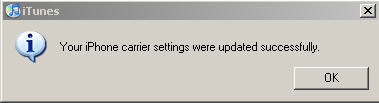
If your iPhone MMS is not working, make sure you restart your iPhone after updating the carrier settings? First of all, you wil need to update your carrier setting by connecting to iTunes then installing this small update. Make sure you restart your iPhone after the update!
1. Restart your iPhone.
- Hold the power button until "slide to power off" appears.
- Slide to power off your device.
- When it is off, press the power button to turn it back on.
2. After restarting your iPhone, you should see the camera in your new and existing SMS messages.

If your iPhone MMS is not working, make sure you restart your iPhone after updating the carrier settings? First of all, you wil need to update your carrier setting by connecting to iTunes then installing this small update. Make sure you restart your iPhone after the update!

1. Restart your iPhone.
- Hold the power button until "slide to power off" appears.
- Slide to power off your device.
- When it is off, press the power button to turn it back on.
2. After restarting your iPhone, you should see the camera in your new and existing SMS messages.


Wednesday, September 23, 2009
Apple iTunes 9.0.1
Yikes, a new Apple iTunes 9.0.1 already! Here's the list of fixes that Apple provided.
Apple iTunes 9.0.1 provides a number of important bug fixes, including:
• Resolves issues browsing the Apple iTunes Store.
• Addresses a performance issue where iTunes may become unresponsive.
• Fixes a problem where Apple iTunes may unexpectedly quit.
• Fixes a problem syncing Podcasts in playlists to iPod or iPhone.
• Fixes a problem sorting albums with multiple discs.
• Improves application syncing for iPod touch and iPhone.
• Genius is now automatically updated to show Genius Mixes.
iTunes 9 comes with many new features and improvements, including:
• An improved look and feel, including a new Column Browser for easily browsing your artists or albums, movies, TV shows, and more.
• The Apple iTunes Store has a brand new look, with improved navigation for quick and easy exploration.
• iTunes LP and Apple iTunes Extras create unique experiences that feature exclusive interviews, videos, photos, and more — available with select album and movie purchases on the iTunes Store.
• Home Sharing helps you manage your family's iTunes collection between computers in your home. iTunes can automatically transfer new purchases, or you can choose just the items you want.
• Genius Mixes are created for you by Apple iTunes and play songs from your library that go great together.
• iPod and iPhone syncing now allows you to organize your iPhone and iPod touch home screens directly in iTunes. Syncing is now also more flexible, allowing you to sync individual artists, genres, or TV show and Podcast episodes.
• iTunes U items are now organized into their own section in your iTunes library.
• Sync with iPod nano (5th generation), iPod classic (Fall 2009), and iPod touch (Fall 2009).
• iTunes 9 also includes many other improvements, such as HE-AAC encoding and playback, more flexibility with Smart Playlists rules, simpler organization of your media files inside an iTunes Media folder, and more.
Reference: Apple
Apple iTunes 9.0.1 provides a number of important bug fixes, including:
• Resolves issues browsing the Apple iTunes Store.
• Addresses a performance issue where iTunes may become unresponsive.
• Fixes a problem where Apple iTunes may unexpectedly quit.
• Fixes a problem syncing Podcasts in playlists to iPod or iPhone.
• Fixes a problem sorting albums with multiple discs.
• Improves application syncing for iPod touch and iPhone.
• Genius is now automatically updated to show Genius Mixes.
iTunes 9 comes with many new features and improvements, including:
• An improved look and feel, including a new Column Browser for easily browsing your artists or albums, movies, TV shows, and more.
• The Apple iTunes Store has a brand new look, with improved navigation for quick and easy exploration.
• iTunes LP and Apple iTunes Extras create unique experiences that feature exclusive interviews, videos, photos, and more — available with select album and movie purchases on the iTunes Store.
• Home Sharing helps you manage your family's iTunes collection between computers in your home. iTunes can automatically transfer new purchases, or you can choose just the items you want.
• Genius Mixes are created for you by Apple iTunes and play songs from your library that go great together.
• iPod and iPhone syncing now allows you to organize your iPhone and iPod touch home screens directly in iTunes. Syncing is now also more flexible, allowing you to sync individual artists, genres, or TV show and Podcast episodes.
• iTunes U items are now organized into their own section in your iTunes library.
• Sync with iPod nano (5th generation), iPod classic (Fall 2009), and iPod touch (Fall 2009).
• iTunes 9 also includes many other improvements, such as HE-AAC encoding and playback, more flexibility with Smart Playlists rules, simpler organization of your media files inside an iTunes Media folder, and more.
Reference: Apple
Tuesday, September 15, 2009
Google Search Query: This site may harm your computer message
This morning I was performing a Google search query for identity of the suspect in the Annie Le case. The police have not issued the name of the Yale Lab Technician yet, and I was curious if the suspect's identity had been released to the public by the blogosphere or the Twitter community. I noticed that there are some sites listing the name "Lei Zhang" but appears these sites are posted by Phishers (Wikipedia: those engaging in phishing or the criminally fraudulent process of attempting to acquire sensitive information such as user names, passwords, credit card details), spammers and possibly black hat affiliate marketers. If you see a warning message from your browser: "This site may harm your computer" you should immediately close your browser window and not click on any of the links on that site.

Update: Raymond Clark is now being named as the suspect in the Annie Le case.
http://gawker.com/5360215/report-suspect-in-yale-killing-is-identified

Update: Raymond Clark is now being named as the suspect in the Annie Le case.
http://gawker.com/5360215/report-suspect-in-yale-killing-is-identified
Monday, September 14, 2009
Shino is the Asian Line Judge in Serena Williams U.S. Open Incident
If you want to know the identity of the Asian line judge in the Serena Williams U.S. Open tennis match, her name is Shino.
According to the New York Times in an article that was later changed, the identity of the Asian Line Judge or Asian lineswomen is Shino which would probably make her of Japanese ethinicity or heritage.
Whenever there is a breaking news story, I personally believe I can find just about anything on the Internet. This morning someone called to ask me if I knew the name of the line judge. I told them I would try and find it, so here it is.
Finally, does it really matter what the race, ethnicity or heritage is of the line judge? Why does the media always use the race card?
Source:
http://www.mediaite.com/tv/serena-williams-tennis-tantrum/
According to the New York Times in an article that was later changed, the identity
of the Asian Line Judge or Asian lineswomen is Shino which would probably make her of Japanese ethinicity or heritage. Whenever there is a breaking news story, I personally believe I can find just about anything on the Internet. This morning someone called to ask me if I knew the name of the line judge. I told them I would try and find it, so here it is.
Finally, does it really matter what the race, ethnicity or heritage is of the line judge? Why does the media always use the race card?
Source:
http://www.mediaite.com/tv/serena-williams-tennis-tantrum/
Thursday, September 10, 2009
Airlines Twitter - A list of Airlines on Twitter
See the link below to the list of Airlines on Twitter. If you haven't added these to your Twitter Friends list, you should do so now!
List of Airlines on Twitter
List of Airlines on Twitter
Here’s the list of Airlines with Twitter Accounts.
@AirFranceUS - Air France Twitter account
@AlaskaAir - Alaska Airlines Twitter account
@AAirwaves - American Twitter account
@Continental - Continental Twitter account
@DeltaAirlines - Delta Twitter account
@JetBlue - JetBlue Twitter Account
@FlyHawaiian - Hawaiian Arilines
@SouthwestAir - Southwest Airlines
@SpiritAirlines - Spirit Airlines
@UnitedAirlines - United Airlines Twitter account
@USAirways - USAirways Twitter account
@VirginAmerica - Virgin Airlines
Wednesday, September 09, 2009
Updating to iPhone 3.1, iTunes 3.1, iTouch 3.1
I started updating some of my iPhones today. The first thing I noticed is that there is a new iPhone Configuration Utility that is downloaded and installed with my iPhone Windows installation. This program is downloaded and installed separately.
Here are the software items that were downloaded:
- QuickTimes (Mac 59.4MB)
- iTunes 9 upgrade (Mac 85.5MB)
- iPhone Configuration Utility
- iPhone Software Update (306.2 MB)(iTouch Mac 238.2 MB)
Here are some iPhone 3.1 and iTunes 9 installation tips.
- The download and installation process could take 45 minutes to 1 hour+
- The size of the file downloads is large so you might want to ensure you have the fastest Internet connection.
- You will need to restart your computer during the installation.
- The iPhone Configuration Utility is only for Windows PCs.
Here are the updating steps:
- Extracting Software
- Backing up "User Name's iPhone".."
- Verifying iPhone update with Appple...
- Preparing iPhone for software update...
- Waitng for iPhone...
- Updating iPhone software...
- Verifying updated iPhone sofware...
- Updating iPhone firmware...
Here are the iPhone 3.1 Features
- Genius recommendations for Applications
- iTunes 9 Support
- Genius Mixes
- Organize apps directly in iTunes
- Improved synching options for music, movies, TV shows, podcasts and phots
- Itunes U content organization
- Redeem iTunes gift cards, codes and certificates in the App store
- Display available iTunes account credits int he App Store and iTunes Store
- Save video from Mail and MMS into Camera Roll
- Option to "Save as new clip" when trimming a video on the iPhone 3GS
- Better iPhone 3G Wi-Fi performance when Bluetooth is turned on.
- Remotely lock iPhone with a passcode with MobileMe
- Use Voice Control on iPhone #GS with Bluetooth headsets
- Paste phone numbers into the Keypad
- Option to use the Home button to turn on Accessibility on the iPhone 3GS
- Warn when visiting fraudulent websites in Safari (anti-phishing)
- Improved Exchange calendar synching and invitation handling
- Fixes issue that caused some app icons to display incorrectly.
Other Notes
- On my MacPro, I also run Parallels.
Here are the software items that were downloaded:
- QuickTimes (Mac 59.4MB)
- iTunes 9 upgrade (Mac 85.5MB)
- iPhone Configuration Utility
- iPhone Software Update (306.2 MB)(iTouch Mac 238.2 MB)
Here are some iPhone 3.1 and iTunes 9 installation tips.
- The download and installation process could take 45 minutes to 1 hour+
- The size of the file downloads is large so you might want to ensure you have the fastest Internet connection.
- You will need to restart your computer during the installation.
- The iPhone Configuration Utility is only for Windows PCs.
Here are the updating steps:
- Extracting Software
- Backing up "User Name's iPhone".."
- Verifying iPhone update with Appple...
- Preparing iPhone for software update...
- Waitng for iPhone...
- Updating iPhone software...
- Verifying updated iPhone sofware...
- Updating iPhone firmware...
Here are the iPhone 3.1 Features
- Genius recommendations for Applications
- iTunes 9 Support
- Genius Mixes
- Organize apps directly in iTunes
- Improved synching options for music, movies, TV shows, podcasts and phots
- Itunes U content organization
- Redeem iTunes gift cards, codes and certificates in the App store
- Display available iTunes account credits int he App Store and iTunes Store
- Save video from Mail and MMS into Camera Roll
- Option to "Save as new clip" when trimming a video on the iPhone 3GS
- Better iPhone 3G Wi-Fi performance when Bluetooth is turned on.
- Remotely lock iPhone with a passcode with MobileMe
- Use Voice Control on iPhone #GS with Bluetooth headsets
- Paste phone numbers into the Keypad
- Option to use the Home button to turn on Accessibility on the iPhone 3GS
- Warn when visiting fraudulent websites in Safari (anti-phishing)
- Improved Exchange calendar synching and invitation handling
- Fixes issue that caused some app icons to display incorrectly.
Other Notes
- On my MacPro, I also run Parallels.
iTunes 9 and iPhone 3.1 to be available today
iTunes 9 and iPhone 3.1 should be available later today according to the Apple Keynote today.
iPhone Tethering
We'll see if this works after the iPhone 3.1 Update.
iPhone Tethering
ttp://www.fastcompany.com/blog/chris-dannen/techwatch/simple-secret-iphone-tethering-fix
iPhone Mobile Safari Link
http://help.benm.at/help.php
iPhone Tethering
ttp://www.fastcompany.com/blog/chris-dannen/techwatch/simple-secret-iphone-tethering-fix
iPhone Mobile Safari Link
http://help.benm.at/help.php
Monday, August 24, 2009
Michael Beasley - Top Google Search Term Today
On Sunday afternoon, I was reading my Twitter account and read some not so nice things about Miami Heat forward Michael Beasley. At the time, I was angry at one of the 
local reporters for posting a blog entry about it and decided not to comment on his blog in the best interests of Beasley. I have been following Michael Beasley and some of the other Miami Heat on Twitter and I thought that this use of social media was great for both NBA basketball, the fans and the players. Unfortunately, today the top Google Search term of the day was "Michael Beasley", his Twitter account is closed and he is now in rehab.
In retrospect, since I am a loyal Heat Season Ticket holder, I guess it may not be all that bad. After spending some time in rehab, maybe Beasley will start the 2009-10 season with renewed explosiveness after finding his way once again in the media for an off the court incident.
As far as the social media angle, let's hope this incident doesn't deter any other NBA players from twittering. As a fan, Twitter is a great insight into the players lives.
Finally, what's the World come to? An NBA player goes into rehab and he becomes the top Google search query term of the day?
local reporters for posting a blog entry about it and decided not to comment on his blog in the best interests of Beasley. I have been following Michael Beasley and some of the other Miami Heat on Twitter and I thought that this use of social media was great for both NBA basketball, the fans and the players. Unfortunately, today the top Google Search term of the day was "Michael Beasley", his Twitter account is closed and he is now in rehab.
In retrospect, since I am a loyal Heat Season Ticket holder, I guess it may not be all that bad. After spending some time in rehab, maybe Beasley will start the 2009-10 season with renewed explosiveness after finding his way once again in the media for an off the court incident.
As far as the social media angle, let's hope this incident doesn't deter any other NBA players from twittering. As a fan, Twitter is a great insight into the players lives.
Finally, what's the World come to? An NBA player goes into rehab and he becomes the top Google search query term of the day?
Subscribe to:
Posts (Atom)


 Posts
Posts

